
How A-LMBS combat actually works in Tales of Eternia Remastered, plus where to find Boost, Battle Retry, Quick Recovery and the encounter toggle.
Tales of Eternia Remastered Battle System Guide
Tales of Eternia Remastered keeps the original Aggressive Linear Motion Battle System: real-time 2D fights where you steer one character, the other three follow AI rules you set, and you can hand control to another party member mid-fight. Almost every new battle feature is a menu setting rather than a button combo. Boost lives at Menu > Custom > "Boost Function" and holds thirteen modifiers, Encounter Rate (OFF / LOW / ON) among them. Battle Retry appears on the Game Over menu after a loss, Quick Recovery runs from the menu screen, and the only new control that works inside a fight is the high-speed switch for AUTO mode.
- The encounter toggle is not a separate Options entry - it is the Encounter Rate row inside Boost.
- Boost's damage multiplier hits your party and the enemy alike, so it is a pacing dial, not a safety net.
- Single-player only. The 2000 PlayStation version let up to four players share one battle.
What the Aggressive Linear Motion Battle System Actually Is
Start with Bandai Namco's own description, because it names the three things that decide every fight: chaining, spacing and real time.
Chain powerful Artes, position your party with intent, and take control of fast-paced 2D battles that play out in real time rather than through menus.
Official source: Everything New in Tales of Eternia Remastered (Bandai Namco Europe)
The remaster's store page and press material call it the Aggressive Linear Motion Battle System, or A-LMBS, while the 2000 game and its manuals are normally described as the plain Linear Motion Battle System - same engine family, newer branding. Bandai Namco published no remaster control chart, so the loop below is the original release's own description, with the multiplayer line from the remaster's store listing.
| Part of the loop | How it works |
|---|---|
| Battle space | 2D side-on arena; movement and attacks resolve in real time, no turn order |
| Who you control | One character directly; the rest follow AI rules you set before and during battle |
| Switching and orders | You can change which character you control mid-fight, and order allies to fire specific artes on command |
| Menus in battle | Action can be paused for menus; item use and AI settings worked in battle, the rest did not |
| Multiplayer | None here; the PlayStation original allowed up to four players on one console |
One inherited quirk explains a lot to returning players: the remaster is built on the later PlayStation Portable port rather than the 2000 disc, which is why battles fill a widescreen frame. Reviewers, not Bandai Namco, are the source for that reading, and the original versus remastered comparison covers the rest.
Arte Chaining, Positioning and the Battle HUD
Damage comes from chains, not from one correct move. Bandai Namco's line is "diverse Arte usage, continued combos, and coordination with each unique party member": normal attacks string into artes, and artes string into each other when range and timing line up. Because the arena is lateral, whether your target stands in front of or behind the character swinging decides whether the chain continues. In the official battle screenshots, the active formation name sits under the party HP row, with the artes resource the original release calls TP beside each character's HP.
Formation, AI rules and command settings decide how a fight opens, which is why the artes and combo guide and the party setup guide change your damage output most. The change list never reprints the control scheme, so check the in-game Help entry for button detail.
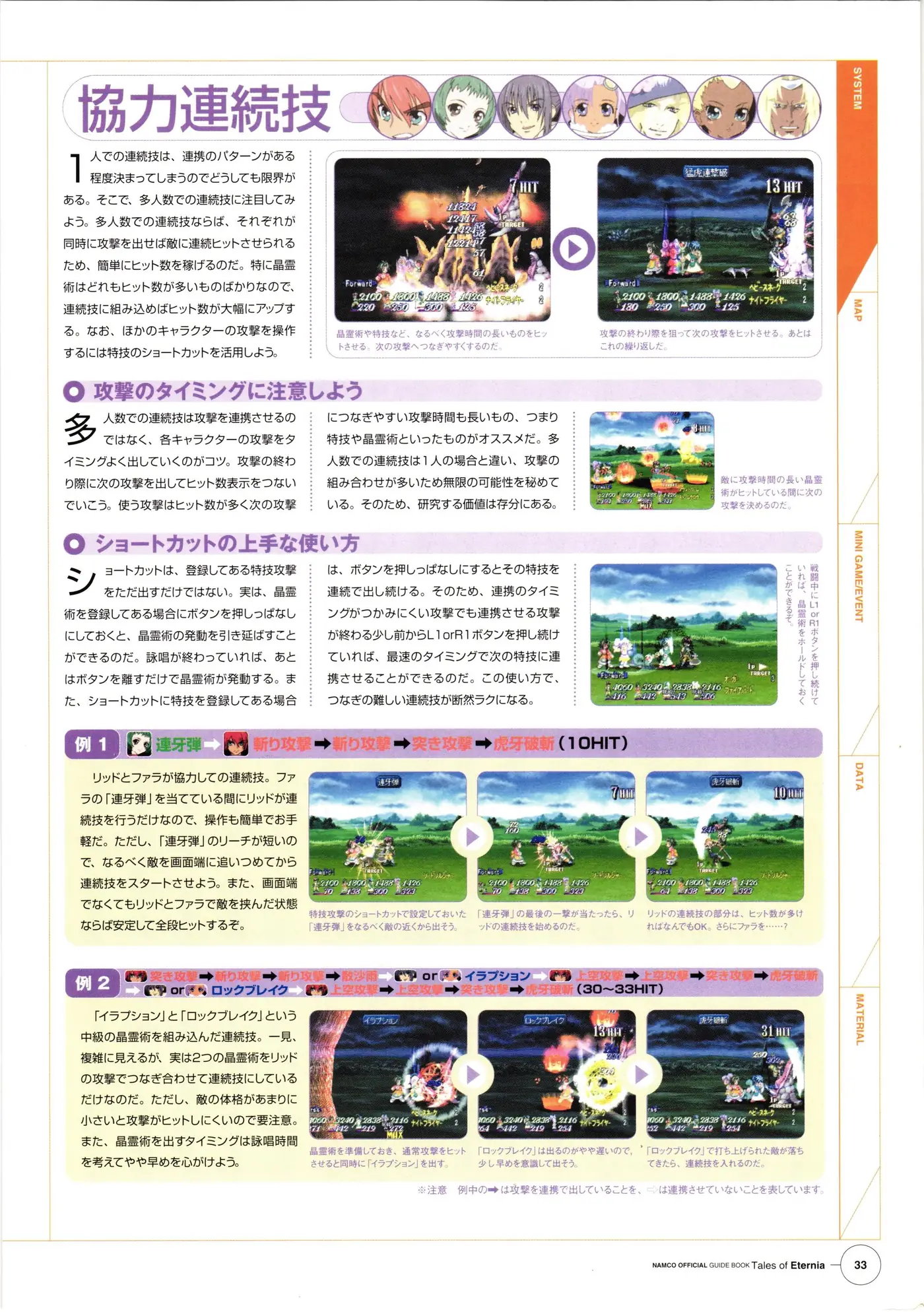
That page is the combos section of the Namco Official Guide Book printed for the 2000 release - worth a look when chain timing feels opaque, with the caveat that it documents the PlayStation original, not this build.
Official source: Namco Official Guide Book: Tales of Eternia (Internet Archive scan)
Menu Paths for Every New Battle Assist
This is the part the change list does spell out, and the right-hand column answers the question the text usually dodges: can you touch it during a fight?
Official source: Remastered change list (Bandai Namco official site, Japanese)
| Feature | Exact path | Mid-battle? |
|---|---|---|
| Boost Function | Menu > Custom > "Boost Function" | No in-battle control; official wording is "at any time, with the exception of a few items" |
| Encounter rate | The Encounter Rate row inside the Boost screen (OFF / LOW / ON) | No. Set it before you leave town |
| AUTO high-speed | Press the corresponding button during battle while AUTO is active | Yes, and press it again to return to normal speed |
| Battle Retry | Game Over menu > "Battle Retry" | Not a setting; it appears on the Game Over screen |
| Quick Recovery | Menu screen: press the corresponding button, then pick the healing method and percentage | Menu screen only |
| Combat level | Menu > Custom > "Combat Level" | Out of battle |
| Battle music | Menu > Custom > "Battle BGM Settings" | Out of battle; Deluxe Edition owners only, and random encounters only |
Bandai Namco's wording is that Boost can be switched "at any time, with the exception of a few items", and that is the entire published detail. Nothing official says which rows lock, or whether the Custom screen opens mid-combat at all. If a setting will not move, do not assume a bug: finish the fight and try again from the field.
The encounter switch is the Encounter Rate row inside Boost, and combat level is the row an Extreme or Unknown setting belongs to - the difficulty modes page maps those tiers.
Boost Function: The Thirteen Modifiers
Bandai Namco's European launch notes describe Boost in one clause: "a Boost feature to adjust experience gained and encounter frequency." The fuller list - posted by Bandai Namco and TOSE ahead of release and reproduced with values by Noisy Pixel - carries thirteen rows.
| Modifier | Values |
|---|---|
| Experience Gained | 0x / 1x / 2x / 4x |
| Gald (money) Gained | 0x / 1x / 2x / 4x |
| Damage | 1x / 2x / 5x |
| Combat Proficiency | 1x / 2x / 4x |
| Cooking Proficiency | 1x / 2x / 4x |
| Encounter Rate | OFF / LOW / ON |
| Maintain Party Formation | OFF / ON |
| Double Skill Usage Count | OFF / ON |
| Double Item Drop Rate | OFF / ON |
| Reduced TP Cost for Skills | OFF / ON |
| Disable Death Penalty | OFF / ON |
| Recover TP While Camping | OFF / ON |
| Expand Maximum Item Carry Limit | OFF / ON, permanent once enabled (the cap becomes 99) |
A Tokyo Game Show 2026 hands-on session reported that the damage multiplier scales incoming damage as well as outgoing, and that session ended early when an enemy wiped out two party members with the multiplier raised. Raising it is not the same as lowering the difficulty.
Boost is a pacing tool, not a cheat menu: the Experience and Gald rows do not change how a fight plays, the damage row changes both sides of the same equation, and the two proficiency rows exist for players chasing titles and skill unlocks. The leveling and Gald farming page covers which rows save real time. One limit worth stating as a limit: those values come from pre-release reporting of Bandai Namco's posted list, not a released-build dump, so a patch could move rows.
Turning Random Encounters Off
The official phrasing is that you can "disable enemy encounters to explore and follow the plot in peace, then switch them back on" when you want to level again. You flip the Encounter Rate row off inside the Boost screen; the same row also offers LOW, the better pick if you still want the experience.
Two details matter here. Toggling encounters off puts a prohibition icon on the right side of the screen, so you can see which mode you are in instead of discovering it by walking. And what you are disabling is random encounters specifically - scripted fights and bosses are not covered, which lines up with the official note that the Deluxe battle music setting "will only apply to random encounter battles". A long stretch with them off is a long stretch with no levels, and the beginner guide covers where that trade is worth taking.
Battle Retry, Quick Recovery and AUTO High-Speed
Battle Retry is offered when you lose. The official line is that "even if you lose a battle and get a game over, you can try again by selecting Battle Retry from the Game Over menu", and the same bullet is written as a feature "for when you lose a regular battle". No official source lists which fights are excluded, so treat it as confirmed for ordinary encounters and unconfirmed for bosses. If you are counting on a retry to beat a boss, save first.
Quick Recovery is a full-party heal button. Pressing the corresponding button on the menu screen opens a prompt where you choose the healing method and the percentage, and it then restores HP and clears status ailments for the whole party at once. It beats walking to an inn with four characters at low HP.
AUTO mode with high speed is the grind answer. AUTO hands the fight to the AI on instructions you have preset, and while AUTO is active, pressing the corresponding button switches the battle into high-speed mode; pressing it again returns to normal speed. This is the only new battle control that works mid-fight. Hands-on reports warn that leaving AUTO running makes HP management harder and forces manual item use, so the sane pattern is AUTO plus high speed for routine encounters and manual play for anything with a name.
FAQ
How do you turn off random encounters in Tales of Eternia Remastered? Through the Encounter Rate row inside the Boost Function screen, at Menu > Custom > "Boost Function". The options are OFF, LOW and ON.
Can Battle Retry be used on boss fights? Unconfirmed. The official list words it as a retry "for when you lose a regular battle", and Bandai Namco has not published which battles count as regular, so the safe assumption is that ordinary encounters offer it and scripted fights may not.
Which new battle features can I use during a fight? The AUTO high-speed toggle, and that is the only new one. Boost, Encounter Rate, Quick Recovery and combat level are all set from out-of-battle menus. The original engine already allowed item use, AI settings and character switching inside battle, and the remaster did not remove those.
Is there co-op or multiplayer in this version? No. The Steam listing carries Single-player only with no co-op tag, and the build is based on the PSP port, which had already dropped multiplayer. The 2000 PlayStation release let a party be shared by up to four players.
Related Guides
- Tales of Eternia Artes List and Combo Guide - how to string normal attacks into artes, and which chains are worth practising.
- Tales of Eternia Remastered Difficulty Modes Explained - Extreme versus Mania versus Unknown, and what the Combat Level row offers you.
- Tales of Eternia Remastered Beginner Guide and Tips - the first three hours, including when to leave encounters on.
- Tales of Eternia Original vs Remastered: What Changed - why battles are widescreen now, and what the PSP-based build changed.
More Tales of Eternia Remastered Guides
Tales of Eternia Remastered on PS5, PS4, Xbox, Switch, Switch 2 and Steam: target resolutions, the 60fps cap, day-one update sizes and measured load times.
Tales of Eternia Remastered fixes: the Switch analog movement bug and its d-pad workaround, long Switch 1 loads, and the docked Steam Deck 720p lock.
New to Eternia? How the destination icons work, when to use Boost and Battle Retry, which early purchases are traps, and when cooking starts paying off.
A chapter-by-chapter walkthrough hub covering all three arcs of Remastered, with links to boss strategies, Craymel dungeons and missable events.
HowLongToBeat has no remaster times yet; the 2000 original averages 33 hours for the story, 42 with sides and 73.5 hours for full completion.
Every Tales of Eternia minigame and where to find it: the Rasheans river race, Craymel Ball, Chamballoon, the stone game and the cooking contest.
Every Tales of Eternia artes family by character: Reid, Farah, Keele, Meredy, Chat and Max, with TP costs, unlock conditions, combo routing and Mystic Artes.
The best party in Tales of Eternia Remastered is Reid, Farah, Keele and Meredy, with the Craymel Cage split deciding who heals and who carries the damage.